As the race approaches, you can find your start number on the participant list. About 5 days before race day, you will receive a confirmation email with the final information and details of your bib number.
At the pick-up point, go to the table that displays your race number and state your start number, You will receive your start number and T-shirt/race bag.
You will not automatically receive a race number once you have registered.
We assign bib numbers the week before the race. Once you have been assigned a bib number, you will receive a confirmation email with the final details and information about your bib number.
Approximately 5 days before race day, we will send a confirmation email with the final information and details of your race number. These emails will be sent out once we have assigned you a race number.
If you have been assigned a start number but have not received an email, it may be that it has gone through your spam filter or that you have entered the wrong email address. If this is the case, you can find your number on the participant list.
At the pick-up point, go to the table that displays your start number and state your start number, and you will be handed your start number, T-shirt and race bag.
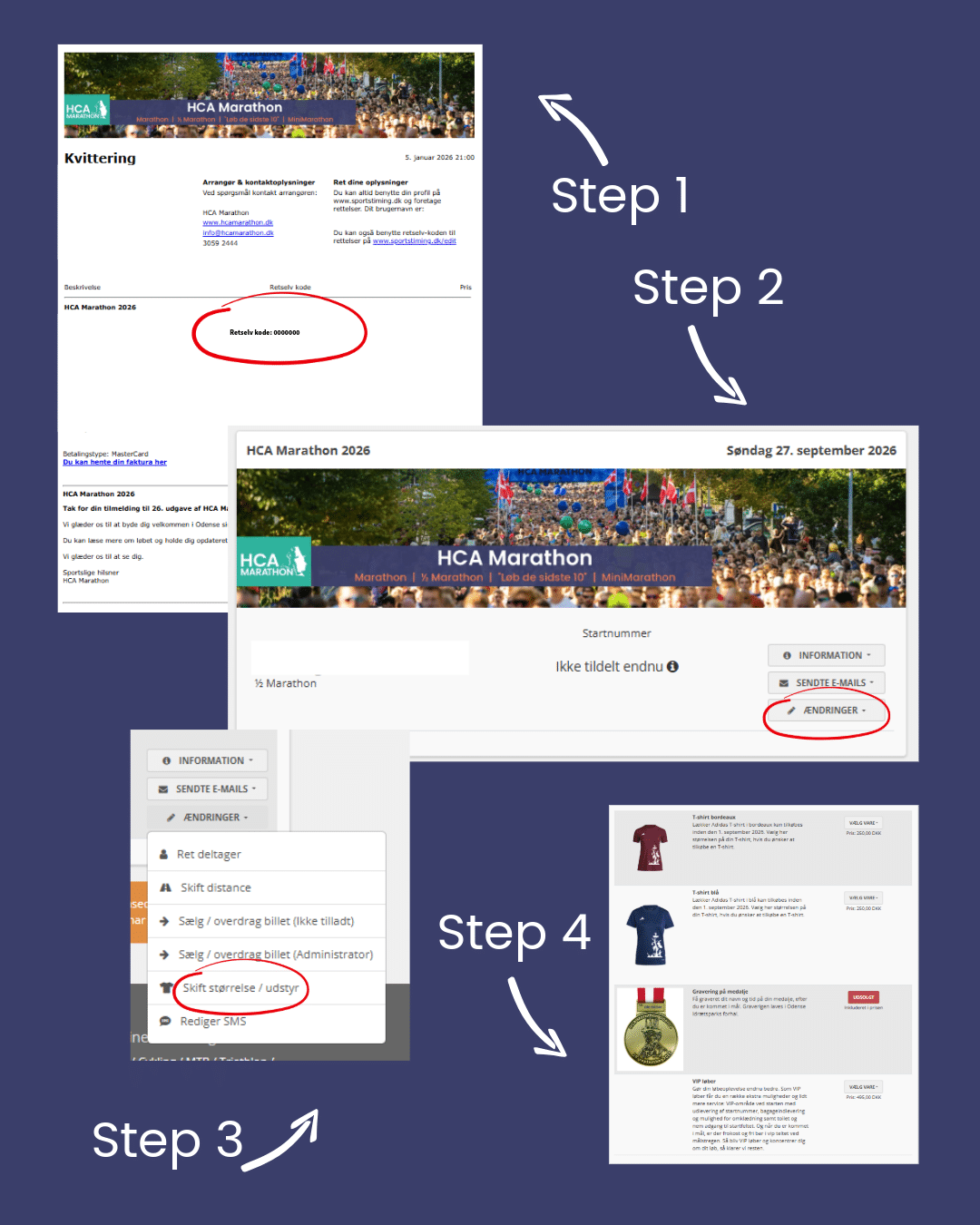
You can find your receipt in the following ways:
You can transfer your race number to someone else as long as online registration is open:
REMEMBER To change ALL data.
OR
The bibs will be printed with the runner's name on it. If you hand over your bib in the last few weeks before the race, it will carry the name of the first registered runner.
For the info and results list, it is very important to change the name and data of the new runner.
ATTENTION! It is not possible to change T-shirt sizes in the weeks leading up to the race, but there will be an exchange option at the number desk after the race (while stocks last).
Once online enrolment is closed, handover can only be done at the number issuing desk.
How to access the shop where you can find t-shirts, magnets, medals, medal engraving, etc., depending on the race you are registered for.
See how to do it below:
OR
See the guide here.
For races where T-shirt is optional, you can change your T-shirt size as long as there are sizes to change to, but no later than two weeks before the race.
See how to do it below:
OR
See the guide here.
You have now resized your T-shirt.
It is not possible to change T-shirt sizes in the weeks leading up to the race, but there will be an exchange option at the number desk after the race - in unused condition and while stocks last.
HCA Marathon is not able to refund the entry fee.
But you are welcome to hand it over to someone else.
You can change the distance yourself if the distance you want to change to is not sold out. The deadline is two weeks before race day.
See how to do it below:
In the last two weeks before race day, please write to info@hcamarathon.dk to change the distance if it is not sold out. On race day, you can change the distance at the number desk if it is not sold out.
Would you like to come for a run yourself – and at the same time enjoy an extra special experience before and after? As a VIP runner, you get access to our VIP marquee in the start area, where there is changing facilities, baggage drop, toilet access and the opportunity to fuel up with snacks and drinks before the start.
You can choose to run a half marathon or marathon as a VIP runner.
See how to do it below:
OR
See the guide here.